Tag Archives: Android

[Android] 위젯 컨트롤들의 터치 이벤트 막기 (Prevent touch event)

안드로이드에서 위젯(Widget)이라고 함은 화면을 구성하는 일반적인 컨트롤 구성요소들을 말합니다.

대표적으로 TextView, Button, ImageView등이 있겠습니다. 하지만 RatingBar등과 같이 자체적인 터치 및 드래그 이벤트를 갖는 위젯들도 있습니다. 이러한 위젯들의 사용자 인터렉션을 원치 않는다면 터치 이벤트를 막아야 합니다.

하지만 setEnable()로 막을경우 색감이 어두워지는 효과를 가지게 되고 setOnClickListener()를 이용하여 값을 원상복귀 시키는 방법도 효과는 없습니다.

다음과 같은 방법을 추천합니다.

main.xml
[code]<?xml version=”1.0″ encoding=”utf-8″?>
<LinearLayout
xmlns:android=”http://schemas.android.com/apk/res/android”
android:orientation=”vertical”
android:layout_width=”fill_parent”
android:layout_height=”fill_parent”>
    
<TextView  
   android:layout_width=”fill_parent”
   android:layout_height=”wrap_content”
   android:text=”@string/hello”/>
<RatingBar
android:id=”@+id/rating”
android:layout_width=”wrap_content”
android:layout_height=”wrap_content”
android:numStars=”5″
android:stepSize=”1″
android:rating=”3″/>
</LinearLayout>[/code]

MainActivity.java
[code]    @Override
public void onCreate(Bundle savedInstanceState)
{
    super.onCreate(savedInstanceState);
    setContentView(R.layout.main);
        
    RatingBar ratingBar = (RatingBar) findViewById(R.id.rating);
    ratingBar.setOnTouchListener(new OnTouchListener()
    {
@Override
public boolean onTouch(View view, MotionEvent event)
{
// 터치 이벤트 제거
return true;
};
    });
}[/code]
위에서 알 수 있듯이 setOnTouchListener를 구현하여 onTouch에서 true를 반환하면 터치 이벤트가 막히게 됩니다.
1350786332.zip

[Android] 전역 변수(Global Variables) 사용하기

안드로이드에서 전역변수란 어떤 의미를 가질까요? 안드로이드는 기본적으로 엑티비티의 모음을 가지고 관리하는 어플리케이션(Application)이라는 객체가 있습니다.

엑티비티는 기본적으로 계속해서 생성되고 소멸되기 때문에 여기에 전역으로 사용할 변수를 보관한다는것이 굉장히 어려운 일이지만 Application은 어플리케이션의 라이프사이클 그 자체이기 때문에 전역변수의 보관용으로 그나마 적절해 보입니다.

이것을 구현하기 위해서는 다음과 같은 방법을 사용하시면 됩니다.

1. AndroidManifest.xml에 Application 객체 정의

<application
  android:name=".MyApplication"
  android:icon="@drawable/icon" android:label="@string/app_name">
  ...
</application>

2. Application을 상속받은 클래스 구현

public class MyApplication extends Application
{
  private String mGlobalString;

  public String getGlobalString()
  {
    return mGlobalString;
  }

  public void setGlobalString(String globalString)
  {
    this.mGlobalString = globalString;
  }
}

3. 전역변수의 활용

public class GlobalVariablesActivity extends Activity
{
  @Override
  public void onCreate(Bundle savedInstanceState)
  {
    super.onCreate(savedInstanceState);
    setContentView(R.layout.main);

    MyApplication myApp = (MyApplication) getApplication();
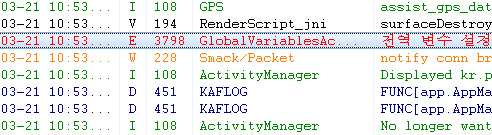
    myApp.setGlobalString("전역 변수 설정");

    Log.e("GlobalVariablesActivity", myApp.getGlobalString());
  }
}

사용자 삽입 이미지