Category Archives: 허접프로그래머

[iPhone] 각종 뷰/컨트롤을 붙일때 배경 투명하게 하기

배경색을 따로 지정하지 않았음에도 자동으로 흰색의 배경색이 들어가게 됩니다.

이것을 제거하기 위해서는 알파값을 조정할수도 있겠지만 배경색을 clearColor로 지정하면 됩니다.

[code]- (void)applicationDidFinishLaunching:(UIApplication *)application {   

    UILabel *notClearedbackground = [[UILabel alloc] initWithFrame:CGRectMake(20.0f, 100.0f, 280.0f, 50.0f)];
    [notClearedbackground setText:@”I have a background color”];
    [window addSubview:notClearedbackground];
    [notClearedbackground release];
   
    UILabel *clearedbackground = [[UILabel alloc] initWithFrame:CGRectMake(20.0f, 200.0f, 280.0f, 50.0f)];
    [clearedbackground setText:@”I’m transparent background”];
    [clearedbackground setBackgroundColor:[UIColor clearColor]];
    [window addSubview:clearedbackground];
    [clearedbackground release];
   
    [window setBackgroundColor:[UIColor grayColor]];
    [window makeKeyAndVisible];
}[/code]
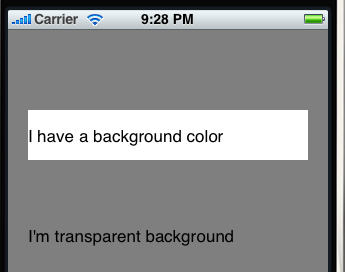
사용자 삽입 이미지위에것이 적용하기 전, 아래것이 적용한 후입니다.

1231788046.zip

[iPhone] failed to locate ResourceRules.plist 관련 에러 해결

외부의 라이브러리를 사용하다 보니깐 알 수 없는 에러를 만나게 되는 경우가 있었습니다.

이 경우 특이하게도 시뮬레이터에서는 정상적으로 실행되는데 디바이스에서 테스트를 해볼려고 하면 다음과 같은 에러가 발생하였습니다.

[code]Internal error occurred while creating dependency graph: ASSERTION FAILURE in /SourceCache/DevToolsBase/DevToolsBase-1148/pbxcore/Target.subproj/XCCodeSignContext.m:458
Details:  Error: failed to locate ResourceRules.plist in ‘(null)/ResourceRules.plist’ or ‘/Developer/Platforms/(null)/ResourceRules.plist’
Object:   <XCiPhoneOSCodeSignContext>
Method:   +defineCodeSignAuxiliaryFilesInTargetBuildContext:
Thread:   <NSThread: 0xa0cf9c0>{name = (null), num = 4}[/code]

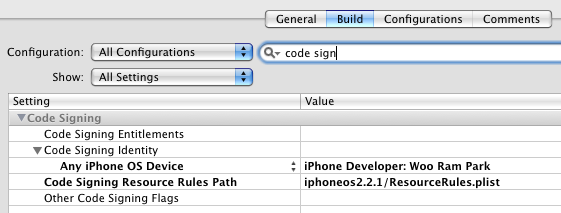
사용자 삽입 이미지프로젝트 설정의 Build탭에 가서 Configuration – All Configuration, Show – All Setting을 선택한 후에 Code Signing Resource Rules Path의 설정으로 ‘$(SDKROOT)/ResourceRules.plist‘을 넣어주면 해결됩니다.

참고 : http://www.stepcase.com/blog/2008/11/24/build-error-after-upgrading-to-iphone-sdk-22/